How to register a CIPC customer account
Your CIPC customer code is more than just a login credential – it’s a key to managing your South African company responsibly.
Without it you cannot lodge changes, submit annual returns or ensure that your company information remains accurate.
In this comprehensive guide, Admin Boss demystifies the customer code, explains who needs one, and shows you how to protect your credentials so you can trade legally and confidently.
What Is a CIPC Customer Code?
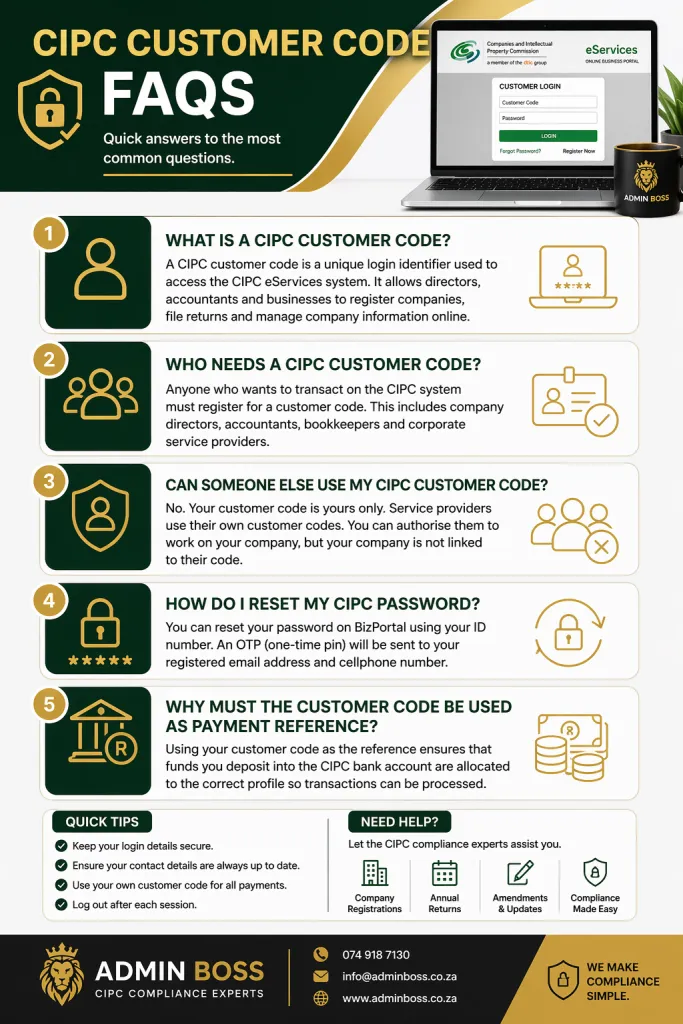
A CIPC customer code is a unique alphanumeric identifier issued by South Africa’s Companies and Intellectual Property Commission (CIPC) when you register as a customer on its e‑Services platform.
Key facts about the customer code
- Link to your identity – The code is linked to your South African ID number and serves as your profile on the CIPC system.
- Universal login credential – It allows you to access CIPC e‑services, BizPortal and the new e‑services platforms with the same password.
- Banking reference – Your customer code must be used as the payment reference when depositing funds for CIPC transactions, ensuring that your money is allocated correctly.
The customer code system helps the CIPC track individual users and maintain accurate records for all company‑related transactions.
Who Needs a Customer Code?
Directors of registered companies
If you are a director of a company registered in South Africa, you need your own customer code to manage the company’s details, submit annual returns and comply with the Companies Act.
Entrepreneurs forming new entities
When you register a new company via CIPC or BizPortal, you must first obtain a customer code. This code becomes your virtual account for deposits and online services.
Agents and representatives
Third‑party service providers (e.g., accountants or consultants) who act on behalf of clients must each have their own customer codes. They cannot use a client’s code; instead, they transact using their own profile and a mandate from the client.
How to Register for a CIPC Customer Code
Step‑by‑step registration
- Navigate to the CIPC e‑Services website: Go to eservices.cipc.co.za or choose “Online Transacting / e‑Services” on the CIPC site..
- Select “Register as a Customer”: This option initiates the once‑off registration process for individuals and organisations.
- Enter your personal details: You’ll need your full name, South African ID number (or passport if you are a foreign national), contact details and email address.
- Create a secure password: Use a strong password that combines uppercase, lowercase, numbers and symbols. This same password will be used across CIPC e‑Services, BizPortal and the new e‑Services platforms.
- Receive your customer code: After submitting the form, you will be assigned a customer code. Write it down and store it securely; you will use it as the reference for all future transactions.
- Verify your email and phone number: An OTP (one‑time password) will be sent to your registered email and mobile number. Enter this code to activate your profile.
Tips for successful registration
- Use the same email address consistently so that password resets and updates can be validated easily.
- Double‑check that all digits in your ID number and phone number are correct; an incorrect number could prevent you from receiving the OTP.
- Keep your password secure but memorable. Do not share it with others – your customer code should remain confidential.
Understanding Your CIPC Profile
Once you have a customer code, CIPC creates a virtual account for you. The profile includes your personal details and a list of companies where you are a director.
Viewing associated companies
After logging into e‑Services, you can see all companies linked to your ID number or that you are authorised to manage. This list updates automatically when new entities are registered under your directorship.
Managing company details
Using your customer code, you can:
- Update director information (address, contact number, email, etc.).
- File annual returns and pay the associated fees.
- Change the company’s registered address or business activities.
- Request or reprint registration certificates and disclosure documents.
Being proactive about these updates ensures your company remains in good standing with the CIPC and avoids penalties.
Making Payments: Why the Reference Matters
For any CIPC transaction that requires payment – such as name reservation, company registration or document copies – you must deposit funds into the CIPC bank account.
Correct deposit reference
The CIPC’s official banking details specify that the payment reference must be your customer code. Without the correct reference, funds may not be allocated to your account and your application could be delayed.
- Bank name: ABSA
- Account name: CIPC
- Account number: 4055681017
- Payment reference: Your customer code
Consequences of incorrect references
If you use a letter “O” instead of zero or vice versa when entering your code, the payment will not reflect. You will need to log an enquiry with the CIPC Finance unit, attach proof of payment and a certified copy of your ID to allocate the funds. This process can take several days, so double‑check your reference before making the deposit.
Password Resets and Updating Contact Details
Resetting your password
If you forget your password:
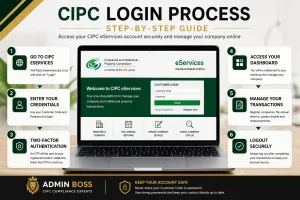
- Go to BizPortal and click Login, then select Reset Password.
- Enter your ID number and click Continue.
- An OTP will be sent to your email and cell phone. Provide the OTP to reset your password.
Note: Your email and cell phone number on the CIPC profile must be valid for the OTP to be delivered.
When your contact details are outdated
If your email or phone number is no longer active, you won’t receive the OTP. In this case:
- Visit the CIPC enquiries page: enquiries.cipc.co.za.
- Choose the Password Reset menu option; no login is required.
- Complete the online form and attach a certified copy of your ID (not older than three months).
- The CIPC back office will update your contact details, after which you can reset your password via BizPortal.
Updating contact details via form
CIPC also provides a Request for Updating Customer Contact Details form. Fill in your customer code, personal details, current and new email addresses, and cell numbers, and email the form with your certified ID to . The new email must send the request so that CIPC can verify ownership.
Keeping your contact details current ensures that you receive important notifications, OTPs and reminders about annual returns.
Working With Third‑Party Service Providers
Authorising an agent
Many business owners choose to work with accountants or company secretaries to handle CIPC tasks. While these professionals can streamline the process, it’s important to understand that:
- You must grant them permission to access and manage your company on your behalf.
- They will use their own customer codes, not yours, to lodge transactions.
- You remain the owner of your company information; your company is not linked to their customer code.
Benefits of third‑party assistance
- Time savings – Professionals are familiar with CIPC systems and can complete tasks quickly.
- Reduced errors – Experts avoid common mistakes like incorrect references or incomplete forms.
- Guidance on compliance – They understand statutory requirements, deadlines and necessary documentation.
Why you still need your own code
Even when using a third party, you must maintain your own customer code. Having a personal account ensures you can verify transactions, monitor your company’s status and take back control if needed. It also provides continuity if you switch service providers.
Filing Annual Returns and Other Transactions
CIPC requires companies and close corporations to file annual returns every year. Using your customer code makes this process straightforward:
- Log in to e‑Services or BizPortal.
- Select “Annual Return” and enter your company registration number.
- Confirm turnover and pay the required fee. You can pay by credit card or deposit funds in advance.
- Receive confirmation of your submission.
Failing to lodge annual returns can result in penalties or deregistration. Use calendar reminders and keep your customer code handy so you can file on time.
Common Mistakes to Avoid
Even experienced entrepreneurs make errors with their customer codes. Here are common pitfalls and how to avoid them:
Misinterpreting characters
Some customer codes contain zeros (“0”) and letters (“O”) or ones (“1”) and the letter “L”. When entering your code as a payment reference or logging in, double‑check each character.
Using someone else’s code
Do not let friends or business partners use your customer code. Their transactions may appear under your profile and create confusion.
Ignoring contact updates
If you change your email address or phone number, update your CIPC profile immediately. Without valid details, you cannot reset your password or receive notifications.
Storing credentials insecurely
Avoid writing your customer code and password on sticky notes or unsecured devices. Use a password manager to keep your credentials safe.
Real‑Life Scenario: How Admin Boss Assisted Siyanda
Siyanda, a young entrepreneur in Johannesburg, registered a private company in 2025 and appointed Admin Boss to handle the paperwork.
The challenge – He initially relied on Admin Boss to submit his annual returns. Two years later, he needed to update his company’s registered address but had lost his login details.
The solution – Admin Boss guided Siyanda through the password reset process. Together they:
- Logged a password reset query on enquiries.cipc.co.za and attached his certified ID.
- Updated his email and phone number so that the OTP could be delivered.
- Demonstrated how to deposit funds using the correct reference to pay for the address change.
- Showed him where to view his list of companies on e‑Services.
The outcome – Within a week, Siyanda regained access, updated his company details and successfully filed his annual return. He now keeps his customer code secure and uses Admin Boss for reminders but manages simple updates himself.
Ensuring You Use the Correct Contact Details
Many issues with customer codes arise from outdated contact information. To maintain a seamless connection:
- Check your email regularly – If you change providers or create a new email, update it on your CIPC profile.
- Verify your cell number – The system uses SMS for OTPs and alerts. Without a valid number you cannot reset passwords or confirm transactions.
- Use official channels – For password resets or updates, use BizPortal or the enquiries page. Do not trust unsolicited emails requesting your customer code or password.
Additionally, always confirm that the bank deposit details and reference are accurate. An incorrect reference can delay your transaction by days or even weeks.
FAQ – Frequently Asked Questions
1. Can I use the same customer code for multiple companies?
Yes. Your customer code is linked to your personal ID. It gives you access to all companies where you are a director or have been authorised. You can manage multiple entities from a single profile.
2. What happens if I lose my customer code?
Your customer code appears on your CIPC profile and on the confirmation email you received during registration. If you forget it, visit the CIPC website and select “Register” on the e‑Services page; there is an option to retrieve your code. You may be asked to provide your ID and registered email address.
3. How long does it take for payments to reflect?
Payments usually reflect within 24 hours if the correct reference is used. However, delays can occur due to system issues. If your funds do not appear after two business days, log a query on the CIPC website and attach proof of payment.
4. Can I change my customer code?
No. The customer code is automatically generated by CIPC and linked to your ID number. If you suspect unauthorised access, reset your password immediately and contact CIPC support.
5. Do foreign directors need a customer code?
Yes. Directors who do not have a South African ID can register using their passport. They will receive a customer code to manage local companies. The process may take longer due to verification requirements.
Final Thoughts
Staying informed and proactive is the cornerstone of good corporate governance.
With the right knowledge and tools at your disposal, you can focus on growing your business while remaining compliant with South African law.
Continue to leverage the expertise of Admin Boss for reliable updates and personalised assistance.
Need Help With CIPC Company Services?
Register your company, update directors, submit annual returns and stay compliant with CIPC. Let the experts at Admin Boss handle the process quickly and professionally.
View All CIPC Services →